Noggin
Switch request headers on and off in a click.
Add a header, give it a value, and Noggin sends it with your browser's requests. Turn each one on or off as you go, or pause them all at once.
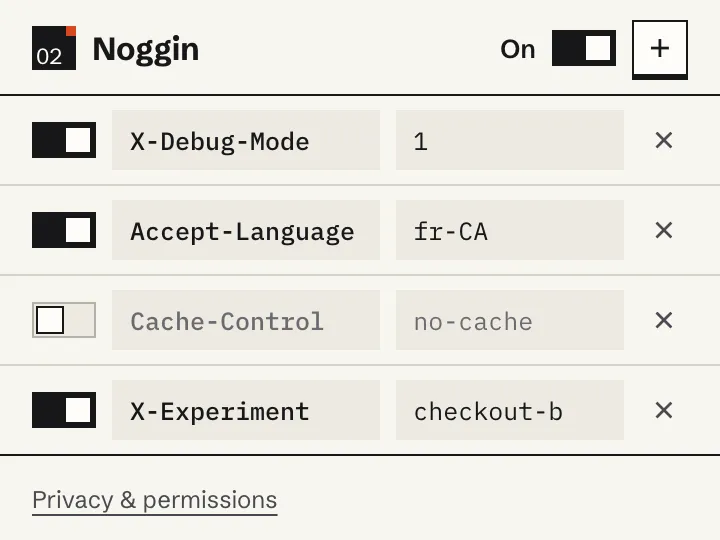
Small and boring on purpose
Noggin is a list of headers and some switches. There are no domain rules to configure and nothing to set up: open the popup, add a name and a value, and it's applied.
- Each header has its own on/off switch
- One master switch pauses everything without deleting anything
- The toolbar badge shows how many headers are active
- Edit or remove a header from the same popup
Useful for quick checks
- Turn on a debug header while you look into a problem
- Try a different
Accept-Language - Send
Cache-Control: no-cachewhile you test a change - Force an experiment variant for a few minutes
Enabled headers are added to requests on every site you visit. If you want headers to apply only to particular domains, or to keep several named configurations, use Bonce.
Install Noggin
Noggin isn't in the Chrome Web Store yet. Until it is, download the ZIP and load it into Chrome yourself. It takes about a minute.
How to install a downloaded extension
- Download
Noggin-v0.1.0.zipand unzip it somewhere you'll keep it. - Open
chrome://extensionsin Chrome. - Turn on Developer mode (top right).
- Click Load unpacked.
- Select the unzipped folder, the one containing manifest.json.
- Pin Noggin from the Extensions menu so it's on your toolbar.
Don't move or delete the unzipped folder, or Chrome will stop loading the extension. Updates aren't automatic: to update, remove the old version and install the new ZIP.
Local storage, no tracking
Your headers and their on/off states are stored only in Chrome's local extension storage. Noggin has no account, no sync, no analytics and no ads, and makes no network calls of its own. Enabled headers are sent to every server your browser contacts, including third-party servers.
Chrome will say Noggin can “read and change data on all websites”. That's the permission Chrome requires for adding headers to requests on any site. Noggin can't read page content or your browsing history. Don't use passwords, session cookies or API tokens as header values: every server would receive them.
Read the Noggin privacy statement. Questions, bugs or ideas: [email protected].