Bonce
Open the version of the site you need.
Keep named sets of request headers and let each one apply itself to the sites it belongs to. Force A/B test variants, open specific site versions and test header-controlled experiences while you develop.
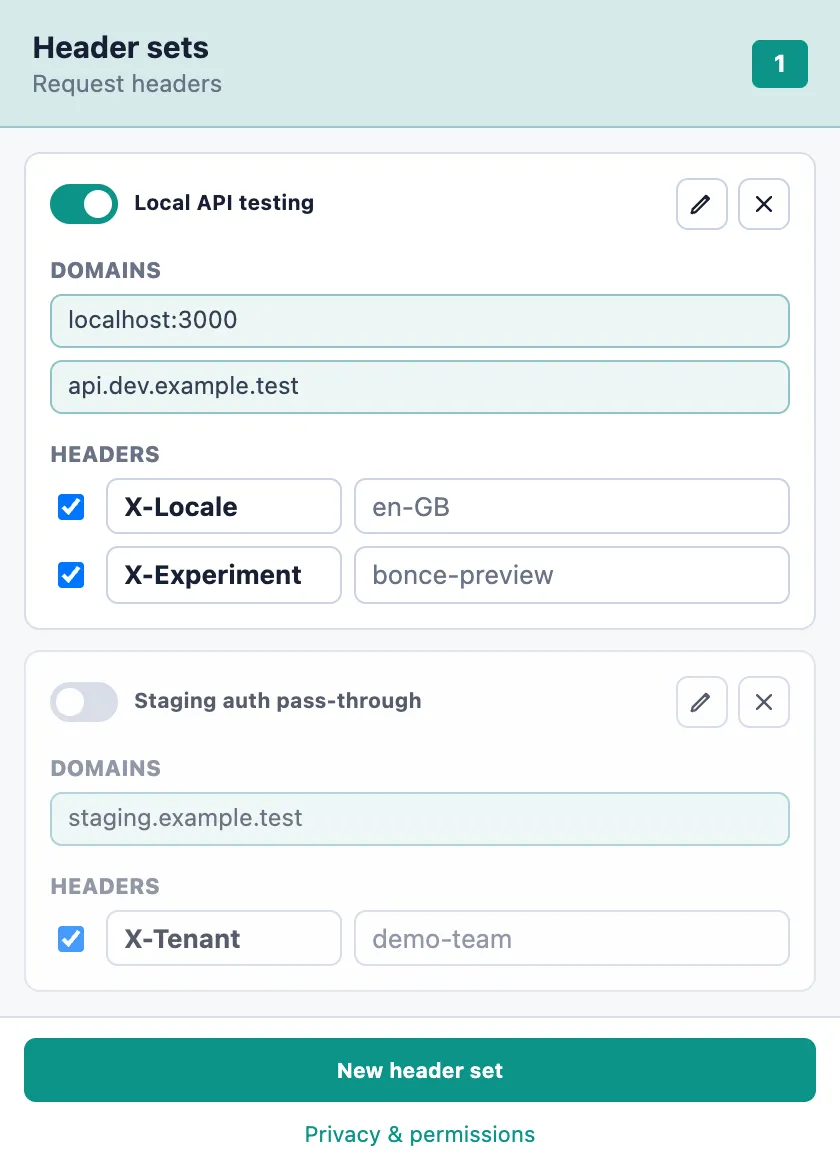
Configure once. Reuse whenever you test.
During development you may need to reproduce an experience controlled by request headers. That can mean changing application code, configuring a proxy or adjusting browser settings again and again.
With Bonce, you save each configuration as a header set: the domains it applies to and the headers to send. Switch a set, or a single header, on and off from the toolbar.
How it works
-
Create a header set
Give the set a useful name and add the request headers needed for the scenario you want to test.
-
Choose where it applies
Target exact domains, wildcard subdomains, pasted URLs or localhost ports.
-
Switch it on
Bonce applies the headers automatically to matching page and resource requests.
-
Change context quickly
Enable or disable a whole set, or a single header, without changing the application or setting up a proxy.
Useful when you need to…
- Force a particular A/B test variant
- Open a specific version of a site
- Test header-controlled routing
- Switch between local, staging and QA configurations
- Reproduce a client, tenant or regional experience
- Apply temporary debugging headers
Need one or two headers on whatever you're browsing, without domain rules? Noggin is the simpler tool.
Install Bonce
Bonce isn't in the Chrome Web Store yet. Until it is, download the ZIP and load it into Chrome yourself. It takes about a minute.
How to install a downloaded extension
- Download
Bonce-v0.1.0.zipand unzip it somewhere you'll keep it. - Open
chrome://extensionsin Chrome. - Turn on Developer mode (top right).
- Click Load unpacked.
- Select the unzipped folder, the one containing manifest.json.
- Pin Bonce from the Extensions menu so it's on your toolbar.
Don't move or delete the unzipped folder, or Chrome will stop loading the extension. Updates aren't automatic: to update, remove the old version and install the new ZIP.
Local by design
Your header sets are stored only in Chrome's local extension storage. Bonce has no account, no sync and no analytics, and makes no network calls of its own.
Chrome will say Bonce can “read and change data on all websites”. That's the permission Chrome requires for adding headers to requests, and Bonce only adds your headers to the domains you choose. It can't read page content or your browsing history. Some headers managed by the browser can't be changed.
Read the Bonce privacy statement. Questions, bugs or ideas: [email protected].